A substantial advantage of the Arduino Due MCU is the native USB High Speed interface allowing up to 480 Mbps transfers. Another option are the costlier Teensy boards that are really mature and provide a solid framework for USB bulk endpoints data interfaces not limited to ttyACM Serial over USB interfaces. However, it is absolutely possible to integrate a vendor (custom) bulk pair of endpoints (IN and OUT) on Arduino Due, it’s just that there is not much documentation besides examples such as the MIDI USB library and articles about it.
In this article, we leveraged the power of LLMs advices and validated them through testing to add support for an additional pair of endpoints, such that the native SerialUSB object could still be used (for telemetry, communication control or debugging)
Incentive.
Using a custom pair of endpoints has several advantages over SerialUSB.
They can be tweaked on the MCU so as to be adapted to the maximum required transfer rate, such as number of BANKs used (up to 3) and NBTRANS.
On the host side, since the endpoints are not claimed by the OS Serial over USB driver, transfers are more straightforward and do not suffer from the long chain of complex buffers used by the driver and the ttyACM stack. Interfacing can be done in user space using libusb.
No tty re-configuring issues, (such as special character handling, line discipline, throttling, etc) Note that tty were historically made for terminals and text, not binary data transfers)
On the downside, detection of host ready or not conditions can be different or tricker than ttyACM, as the linestate logic (DTR emulation) is not present on a custom bulk interface. The idea is thus to keep the Serial USB link for telemetry, control, and debugging, and initiate data transfer once the proper Serial USB transmission. Note that on linux detecting a DTR down condition on SerialUSB does not seem to work as well as on MS Windows from a MCU use case perspective, This all situation needs unfortunately to resort to watchdogs to re-establish a broken connection when the host is electrically connected. but not listening.
Also ttyACM or the tty stack seem to behave on linux so as to limit to 64 bytes max the data fetched fro; each read() call on the port. Since USB 2.0 max packet size is 512 byte, libusb allows more efficient call economy, although the mechanism is largely different, since IO read calls are not used, but library specific “transfer submits”.
In our case, the packet size is 96 byte. All writes to USB from the MCU sides will be 96 byte. Note that packet sizes and URB sizes, ZLP (zero length packets) and libusb “transfer” sizes concepts are important as understanding and managing them properly can save you a lot of headaches.
libusb also has a quite steep learning curve. However, through LLM assistance, we successfully made such an interface.
Note that for “real time” transfers or transfers with timing constraints (continuous flow) a separate FIFO (sched_fifo) thread is preferable on the host side. This will be shown in that example.
The MCU code.
Optimized for 1 to 4 MB/s transfers.
The latest Arduino Due (SAM) framework available in Arduino IDE and Platform IO provide helper objects (Pluggable USB), defines / macros to help in creating additional endpoints.
First we will need some defines that will setup USB endpoint types configuration bitmasks. Here comes the first versatile configuration as these elements are not exposed for the SerialUSB interface.
Note that we use max packet size of 512 byte, which is the maximum allowed by the USB 2.0 High speed standard. EPBK_n_BANK and NBTRANS_p_TRANS admit n and p values up to 3, at the expense of more MCU SRAM used, depending on the throughput required they can be increased and profiled for best performance.
It should be known that EPBK_n_BANK consumes a limited amount of memory available (max 4KB), In the above case, n = 1 consumes 512 bytes. Reaching the hard limit is easy, as the total number of endpoints provided by all interfaces has to be taken into account.
Note that the IN and OUT endpoints are from the reference point of the host (the computer in that case) so a IN endpoint is used to send data from the MCU to the computer.
Then we need to do some class inheritance magic to extend the PluggableUSB module base class and implement our custom calls that will be used for enumeration and communication setup as well as data transfers.
Once our class properly inherits the Pluggable USB module base class, we can create the object
DataBulk_ USBData;
And use it to send data to the computer :
USBData.write((void*) Data2,sizeof(Data2)); // uses our bulk endpoint, processed on the host by// libusb 1.0// sizeof(Data2) is 96 bytes.SerialUSB.println("USB data sent") // uses the native USB port Serial over USB, processed on the host by the ttyACM driver
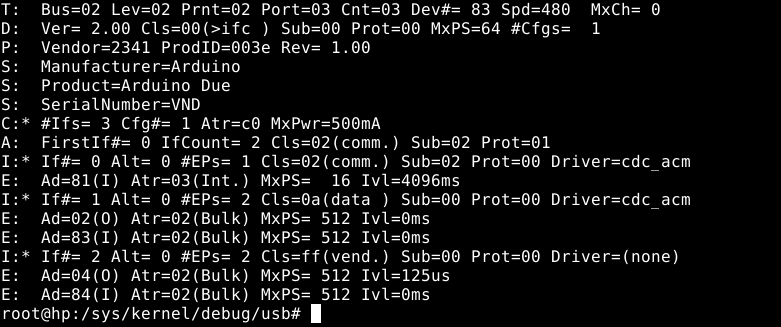
Testing enumeration on the host
To check for proper enumeration once the above code has been added to your sketch, compiled, and uploaded to the MCU is straightforward.
As root, run :
cat/sys/kernel/debug/usb/devices
And the bottom relevant lines (ep 04 and 84 of interface 2) should appear once the native USB port is plugged to the computer :
Libusb code
Now it is time to add libusb code to your C++ project, and add some #define and declarations
// BULK USB VENDOR MODE#include<libusb.h>//defines for bulk interface#defineURB_SIZE 96 // In our case URB_SIZE = Packet size = 96 bytes#defineN_URBS 32 // 16 to 32 URBS in flight seems ok for data rates in the low MB/s range#defineVID 0x2341 // vendor ID of our device#definePID 0x003e // product ID of our device#defineUSB_BULK_IFACE 0x2 // Bulk interface ID#defineEP_IN 0x84 // endpoint IN address#defineEP_OUT 0x4 // endpoint OUT address (not used)struct libusb_transfer *usbxfer[N_URBS];uint8_t*usbbuf[N_URBS];std::atomic_bool readbulk_exit(false);std::atomic_bool USB_transfer_active(true);libusb_context *ctx;libusb_device_handle *h;
Add a FIFO scheduled thread (bulk_read_thread) that will make the initial transfer submit as well as pump the event driven libusb.
the sched_priority attribute is very important. use the ps command to get SCHED_FIFO threads and their priorities, and set priority accordingly as to obtain a stable data flow and so as not make the system irresponsive or lag. Remember that SCHED_FIFO threads have precedence over most of other threads on a system (SCHED_OTHER)
The Thread function follows :
void*BulkReadThread(void*arg){mlockall(MCL_CURRENT | MCL_FUTURE);DebugPrint(dbgstr("Enter USB Bulk read thread"),0);if(USE_BULK){for(int i =0; i < N_URBS; i++){libusb_submit_transfer(usbxfer[i]);}}while(!(readbulk_exit.load())){ //usleep(100);libusb_handle_events(ctx); //DebugPrint(dbgstr("PutSerialSamples ok"),0); sched_yield();}sched_yield();return0;}
The readbulk_exit atomic boolean is used to signal the thread (externally) that it needs to stop USB event polling operations which will quench transfers, Which is used in a graceful program termination.
This thread does not populate directly the data buffer so it can be consumed. It only submits initial transfer requests and pumps events through libusb_handle_events(ctx) The setup of the population of the buffer is done by libusb_fill_bulk_transfer() once, where we supply a callback function, rx_usb_bulk(). See below.
sched_yield() in that case is quite important as it guarantees some throttling and helps with system responsiveness. It relinquishes the CPU and other sched_fifo threads can be immediately processed, regardless of priority.
mlockall() is an optimization as it locks all pages in memory and prevents paging. It may have profound effects on allocation, and should probably happen when most of allocation is done or memory reserved using techniques appropriate, which are beyond the scope of this article. Use with caution.
Of course, now we also need to initialize the whole libusb stack to handle our device :
libusb_init(&ctx);libusb_set_option(ctx,LIBUSB_OPTION_LOG_LEVEL,LIBUSB_LOG_LEVEL_WARNING);h =libusb_open_device_with_vid_pid(ctx,VID,PID);if(!h){DebugPrint(dbgstr("USB open device failed, is it plugged ?"),0);fflush(stdout);return1;}DebugPrint(dbgstr("USB open device OK"),0);if(libusb_kernel_driver_active(h,USB_BULK_IFACE)==1){libusb_detach_kernel_driver(h,USB_BULK_IFACE);DebugPrint(dbgstr("kernel driver detach OK (should not happen, no driver should be attached)."),0);}if(libusb_claim_interface(h,USB_BULK_IFACE)<0){DebugPrint(dbgstr("USB claim interface failed."),0);fflush(stdout);return1;}DebugPrint(dbgstr("USB claim interface OK."),0);for(uint8_t i =0; i < N_URBS; i++){usbbuf[i]=(uint8_t*)aligned_alloc(64,URB_SIZE);usbxfer[i]=libusb_alloc_transfer(0);libusb_fill_bulk_transfer(usbxfer[i], h, EP_IN,usbbuf[i], URB_SIZE, rx_usb_bulk,NULL,0);}readbulk_exit.store(true);
And finally, the rx_usb_bulk() callback function :
staticvoidrx_usb_bulk(struct libusb_transfer *t){if(t->status== LIBUSB_TRANSFER_COMPLETED){if(t->actual_length>0){PutSamplesUSB(t->buffer,t->actual_length); //DebugPrint(dbgstr("Processing of USB transfer buffer,t->actual_length"),t->actual_length,0);}if(USB_transfer_active.load()){libusb_submit_transfer(t); //reschedule transfer immediately, unless signalled to stop.}}}
PutSamplesUSB() is a user project function that handles incoming buffer data, to populate, let’s say a circular buffer from the t->buffer source.
USB_transfer_active is an atomic boolean variable that signals to stop submitting new transfers. It needs to be set to false first before setting readbulk_exit to true (that in turns make the the thread that processes libusb events to join). This happens usually in the graceful process exit / cleanup routines. See below.
Cleanup
Cleanup is required in traditional C++ fashion as well as libusb required calls. But first the dedicated thread that does the libusb event polling must be notified to join.
USB_transfer_active.store(false);DebugPrint(dbgstr("setting USB_transfer_active to false (won't submit new transfers)"),0);for(int i=0; i < N_URBS;i++){libusb_cancel_transfer(usbxfer[i]);DebugPrint(dbgstr("cancelling pending transfers, index="),i,0);}usleep(10000);libusb_release_interface(h,USB_BULK_IFACE);DebugPrint(dbgstr("interface released"),0);libusb_close(h);DebugPrint(dbgstr("USB device handle closed"),0);readbulk_exit.store(true);int s =pthread_join(bulk_read_thread,nullptr); // waiting for USB bulk read thread to joinif(s ==0){DebugPrint(dbgstr("USB bulk read thread joined"),s,0);libusb_exit(ctx);DebugPrint(dbgstr("libusb exit"),0);}
Here we use the boolean state variables to communicate with the thread to halt USB communication before releasing libusb resources.
This concludes the article about adding USB 2.0 (High-Speed) bulk endpoints on Arduino Due MCU and libusb interfacing on Linux.
NOTE: dictionary file count1_w.txt must be in the same directory as the script. outngrams.bin must be in the same directory as the script, if ngrams are used (secondpass=True)
This script is useful for ASCII English text stream compression. It’s pedantic (P in PLETSC stands for “pedantic”) because its final goal is to enforce a minima some English syntactic rules, such as whitespace after “,” but not before, Capitalization after a “.” etc… (but not grammar). Spell check will probably be recommended but should probably be done upstream (by another applicative layer), as it will ensure a better compression ratio – since it is based on words of the english dictionary.
Its compression method is primarily based on a token (words and punctuation) dictionary. It leverages frequency of modern english words:
Words of the primary dictionary are sorted from most used to least used.
The line number is used as an index. (+1) index 0 is reserved for whitespace.
It also uses adaptive length encoding (1-2-3 bytes) First 128 most used tokens are encoded on 1 byte, Next 16384 + 128 on 2 bytes. Next 2097152 + 16384 + 128 on 3 bytes.
The 3 byte address space is split in two :
First part (when byte0 msb is 1 and byte1 msb is 1 and byte2 msb is 0) is further divided into two subspaces.
The first subspace is for the remainder of the primary dictionary (it has 333 333 tokens).
And the second subspace holds an Ngram dictionary (more on that later).
Second part (when byte0 msb is 1 and byte1 msb is 1 and byte2 msb is 1) is further divided into two subspaces.
First part is for a session dictionary. A session dictionary is used to hold repeating unknown tokens. there are 2097152 – 5 codes available for this use. Initially empty. Kept in ram, it is a SESSION dictionary. This session dictionary should not be required to be sent between two parties, as it can be reconstructed entirely from the compressed stream.
Second part is only 5 codes, (TODO, for now just 1 code, and switch between Huffmann and no compression is done in a bool parameter) It is an escape sequence meaning that following bytes will be encoded wit the following methods :
first code : As a stream of chars (no compression), plus a C style termination (chr(0)).
second code : Huffmann encoding, lowercase only.
third code : Huffmann, lowercase + uppercase or uppercase only.
It offers a good compression ratio (between 2.6 and 3.0+), That is, Sizes in % of ORIGINAL size of around 33% to 38%, mainly depending on the lexical complexity or lexical archaism of the source text, and presence of unkwnown or misspelled words.
A higher lexical complexity, or archaic texts, that is, if the input text uses less common words – based on current usage – (2023), will yield lower compression ratios.
The compresion ratio is more or less stable : it is quite independent of text length.
This is contrary to block algorithms that suffer from low compression for small files because of a significant overhead. For larger corpuses, block algorithms usually perform better, and modern methods may use ML methods to provide context and adaptive encoding based on that, they’re usually slower.
This is why this algorithm is intended for stream compression (on the fly). However, its current implementation is based on reading files. and outputting to a file or stdout.
Input text file must be ASCII (for now) or UTF-8 decodable to ASCII (English). It ignores conversion errors. Decoded file will be encoded in ASCII. It should be in English to get adequate conversion.
Both ends (sender and receiver) MUST have the SAME dictionaries and the SAME Huffmann tables, as these are not sent with the data.
The primary dictionary is based on the “count_1w.txt” english dictionary of 333 333 words, (words ordered by lexical prevalence) tweaked with added special characters also listed by order of prevalence and added english contractions, and with word count number stripped off.
It also features a secondary (optional) compression pass based on a compiled dictionary named outngrams.bin.
It features compression for 4 and 5 word ngrams found in the first compression step stream. Ngrams of less than 4 words are deemed not interesting as the first pass will usually encode them on 3 bytes, the same sized as a compressed ngram.
Compression and decompression require the primary dictionary to be available, and the secondary if the boolean SecondPass is set to true, (by default).
The zip “dics.zip” already have a compiled version of these dictionaries.
Main applications could be messaging over low bandwidth links like POCSAG radio text, or JS8Call for HAM radio, and IoT.
However, note that the underlying digital mode should allow binary transmission (not only transmission of printable ASCII characters) for seamless integration.
Main issues for now are syntactic rules and spurious whitespaces, absence of whitespaces were they should have been, problems with hyphenated tokens, spurious newlines, problems with some possessive forms, and special constructs besides emails and well formed URLs.
Useful if you want to tweak or create your own dictionaries, we’ll discuss mainly the outngrams.bin dictionary, as count_1w.txt tweaking is straightforward. Note that count1_w.txt should not be modified once outngrams.bin is generated, or you’ll have to rebuild outngrams.bin
A preparatory step is required to generate a compressed version of the ngrams files, if you want to do it from scratch :
The repo contains scripts that perform the download and concatenation of ngrams according to criterions you specify. Note that LETSC has limited space in the first subspace of the 3 byte. more or less 2097152 – 333333 I have created an ngram list of 1571125 ngrams. The distribution between the 4grams and 5grams is roughly 50%/50%
The resulting CSV files need to be further processed by our algorithm
The script that create outngrams.bin (the secondary compiled dictionary based on the primary dictionary and the ngrams csv files from google-books-ngram) is called ngrams_format_dic.py This script is commented for what each line does.
# LIGHTWEIGHT ENGLISH TEXT STREAM COMPRESSION (LETSC)# (adaptive encoding length 1byte/2byte/3byte based on word dictionary with statistical prevalence ordering - count1_w.txt)# Huffmann encoding for uknown tokens# Enforces English syntax rules for punctuation# Takes into account possessives and contractions# Has URLs and e-mails processing rules, more to follow# Second pass compression using a dictionary of the most frequent 4 N-Grams of English fiction.#GPL 3 License# www.skynext.tech# Rodrigo Verissimo# v0.92# October 21th, 2023# Python + packages Requirements# Python 3.9# nltk, bitarray, bitstring, re, dahuffmann# Performance : ratios between x2.6 for Middle to Modern and elaborate English (ex: Shakespeare)# Up to x3 and more for simple english.# adapted for text messaging / streaming# Requires the same dictionary on both channel endpoints.# ALGORITHM. Very straightforward. (adaptive encoding length based on dictionary with statistical ordering)################################################################################## First byte :#if MSB is 0, a whole word is encoded on the first 7 bits of one byte only.#This makes 127 possible words. These are reserved for the first 127 most used #english words. punctuation also appears as a possible word# Second byte :#if MSB of first byte is 1, and MSB of second byte is 0, a whole word is encoded# with the help of the 7 LSB of byte 1 plus the 7 LSB of byte 2. # This makes room for the next 16384 most used english words.# Third byte :# if MSB of first byte is 1 and MSB of second byte is 1, and the MSB of third byte is 0# a whole word is encoded# with the help of the 7 + 7 + 7 = 21 bits (2 097 152 possible words)# For now, the 3 byte address space is split into two 2 097 152 address spaces# That is, the case of all 3 bytes MSB being 1 is treated separately.# In this adress space, only a handful of codes are used as an escape sequence for particular # Huffmann trees, see below.#->#load dictionary of english words from most used to least used.#punctuation and special characters have been added with order of prevalence.#punctuation frequency is from wikipedia corpus. (around 1.3 billion words) #it has been normalized to the frequency of the 1/3 million word list based #on the google web trillon word corpus. that is, frequencies for special chars have been multiplied by 788.39#wikipedia punctuation is not optimized for chat, as it lower prevalence of chars like question marks#that may appear more frequently in chat situations.# the first tokenizer used does not separate any special character attached (without whitespace) to a word# this will mostly result in an unknown word in the dictionary# this key absence in the reverse dict will be catched and treated by another tokenizer (mainly for possessive# forms and contractions)#for possessives ex: "dog's bone" or plural "dogs' bones" a separate tokenizer is used to split into# "dog" , "'s"# "'s" and "'" also appear in the dictionary.# ROADMAP# remove whitespaces left of punctuation DONE# manage new lines DONE# manage websites and emails DONE# TODO# add spell check ! # TODO# Remove spurious new lines that appear after encoding special sequences such mails or URLS# DONE (basic Huffmann, some chars missing in tree)# add Huffmann encoding for absent words in dictionary (neologisms,colloqualisms,dialects, or misspellings) DONE# DONE# TODO : test with more texts such as wikipedia XML and various authors works, to catch as much# use cases and formatting issues that arise to improve the algorithm# add adaptive Huffmann. use 4 Huffmann trees. (see below)# Assuming there are 4 codes for hufmmann : hufmann lower case, hufmann lower + capitals, huffmann# lower + capitals + numeric, all printable ASCII excluding whitespace : same as preceding category plus # special chars.# Chosing the tree to use would be done by string regex.#DONE# Detect UTF-8 and transcode to ASCII (potentially lossy)#DONE# TODO# Dictionary Learn over time (re-shuffle the order of tokens)# Without transmission of any info between parties# Dangerous if sync is lost between the two parties# TODO# TODO# optimize Huffmann part to remove the need for the chr(0) termination = scan for EOF sequence in Huffmann to get# the Huffmann byte sequence length. TODO# DONE# Add second pass compression using word N-grams lookup table. (4 and 5 N-grams seem to be a good compromize)# The idea is to encode 4 and 5 token substrings in a line by a single 3 byte code.# There is plenty of room left in the 3 byte address space. For now, there is 333 333 - 16384 - 128 tokens used = 316821 tokens used# from 4194304 - 3 total address space.# DONE using 1 571 125 codes for a 50/50 mix of 4grams and 5grams.# There is still at least 2million codes left.# for now we plan 4 escape sequences for the selection of one of the 4 Huffmann trees.# ngrams processing is first done with the create_ngrams_dic.sh script."""python3 ngrams_format_dic.py 4grams_english-fiction.csv outngrams4.txt #remove counts and process contractionspython3 ngrams_format_dic.py 5grams_english-fiction.csv outngrams5.txt #remove counts and process contractionspython3 dicstrv4.py -d outngrams4.txt outngrams4.bin.dup #convert ngrams txt to compressed formpython3 dicstrv4.py -d outngrams5.txt outngrams5.bin.dup #convert ngrams txt to compressed formawk '!seen[$0]++' outngrams4.bin.dup > outngrams4.bin #Remove spurious duplicates that may ariseawk '!seen[$0]++' outngrams5.bin.dup > outngrams5.bin #Remove spurious duplicates that may arisesed -i '786001,$ d' outngrams4.bin # truncate to fit target address spacesed -i '786001,$ d' outngrams5.bin # truncate to fit target address spacecat outngrams4.bin outngrams5.bin > outngrams.bin # concatenate. this is our final formcat outngrams.bin | awk '{ print length, bash $0 }' | sort -n -s | cut -d" " -f2- > sorted.txt # sort by size to have an idea of distribution# ngrams that encode as less than 4 bytes have been pruned since the ratio is 1"""# DONE # It is probable that the most used 4 tokens N-grams are based on already frequent words. that individually# encode as 1 byte or two bytes.# Worst case : all the 4 tokens are encoded in the 1 to 128 addres space, so they take a total 4 bytes.# The resulting code will be 3 bytes, a deflate percent of 25%# If one of the tokens is 2 byte (128 to 16384 -1 address space), then it uses 5 bytes.# deflate percent is 40%# The unknown is the statistical prevalence of two million 4 token N-grams.# (ex: coming from english fiction corpus) in a standard chat text.# First encode the google most frequent 4 and 5 N-grams csv file to replace the tokens in each N-gram by the corrsponding # byte sequences from our codes in the count_1w.txt dictionary. This will be another pre-process script.# The resulting new csv format will be :# some 3 byte index = x04x09x23.# The 3 byte index is simply the line number of the compressed ngram. # read that in ram. Conservative Estimate 4 bytes + 3 bytes per entry 7 bytes * 2 000 000 = 14 Meg memory footprint.# We already have a 4 MB * 3 12 Meg footprint from count_1w (estimate)# Generate the inverse map dictionary (mapping sequences to 3 byte indexes)# x04x09x23' = some 3 byte index# Should not be a problem since there is a 1 to 1 relationship between the two# Then perform a first pass compression.# Then scan the first pass compression file using a 4 token sliding window.# Contractions is a case that will have to be managed.# If there are overlapping matches, chose the match that result in the best deflation, if any.# If the unknown word escape codes appears, stop processing and resume after the escaped word# Overall, replace the byte sequence by the corrsponding 3 byte sequence.# DONEimport sysimport traceback#print(len(sys.argv))#op = (sys.argv[1]).encode("ascii").decode("ascii")#print(op)#quit()if((len(sys.argv)<3)or(len(sys.argv)>4)):print("Syntax for compression :\n")print("python3 dicstrv.py -c <txt_inputfile> <compressed_outputfile>")print("Reads txt_inputfile and writes compressed text stream to compressed_outputfile.\n")print("python3 dicstrv.py -c <txt_inputfile>")print("Reads txt_input file and writes compressed output to stdout\n")print("Syntax for decompression :\n")print("python3 dicstrv.py -x <compressed_inputfile> <txt_outputfile>")print("Reads compressed_inputfile and writes cleartext to txt_outputfile.\n")print("python3 dicstrv.py -x <compressed_inputfile>\n")print("Reads compressed_input file and writes cleartext output to stdout\n")print("NOTE: dictionary file count1_w.txt must be in the same directory as the script.")quit()if(sys.argv[1]=="-c"): compress =True gendic =Falseelif(sys.argv[1]=="-d"): compress =True gendic =Trueelif(sys.argv[1]=="-x"): compress =False gendic =Falseelse:print("unknown operation: "+str(sys.argv[0])+" type 'python3 dicstrv3.py' for help")if(len(sys.argv)==3): infile = sys.argv[2] outfile =''if(len(sys.argv)==4): infile = sys.argv[2] outfile = sys.argv[3]import codecsimport nltkfrom nltk.tokenize import TweetTokenizertknzr =TweetTokenizer()import reimport bitstringfrom bitarray import bitarrayimport structimport timefrom dahuffman import HuffmanCodecdebug_on =Falsedebug_ngrams_dic =Falsesecondpass =Trueuse_huffmann =Falseunknown_token_idx =16384+128+2097152defdebugw(strdebug):if(debug_on):print(strdebug)# Huffmann is only used for absent words in count1_w.txt dictionary# General lower and upper case frequency combined as lowercasecodec_lower = HuffmanCodec.from_frequencies({'e':56.88,'m':15.36,'a':43.31,'h':15.31,'r':38.64,'g':12.59,'i':38.45,'b':10.56,'o':36.51,'f':9.24,'t':35.43,'y':9.06,'n':33.92,'w':6.57,'s':29.23,'k':5.61,'l':27.98,'v':5.13,'c':23.13,'x':1.48,'u':18.51,'z':1.39,'d':17.25,'j':1,'p':16.14,'q':1})debugw(codec_lower.get_code_table())# following is ASCII mixed upper and lower case frequency from an English writer from Palm OS PDA memos in 2002# Credit : http://fitaly.com/board/domper3/posts/136.htmlcodec_upperlower = HuffmanCodec.from_frequencies({'A':0.3132,'B':0.2163,'C':0.3906,'D':0.3151,'E':0.2673,'F':0.1416,'G':0.1876,'H':0.2321,'I':0.3211,'J':0.1726,'K':0.0687,'L':0.1884,'M':0.3529,'N':0.2085,'O':0.1842,'P':0.2614,'Q':0.0316,'R':0.2519,'S':0.4003,'T':0.3322,'U':0.0814,'V':0.0892,'W':0.2527,'X':0.0343,'Y':0.0304,'Z':0.0076,'a':5.1880,'b':1.0195,'c':2.1129,'d':2.5071,'e':8.5771,'f':1.3725,'g':1.5597,'h':2.7444,'i':4.9019,'j':0.0867,'k':0.6753,'l':3.1750,'m':1.6437,'n':4.9701,'o':5.7701,'p':1.5482,'q':0.0747,'r':4.2586,'s':4.3686,'t':6.3700,'u':2.0999,'v':0.8462,'w':1.3034,'x':0.1950,'y':1.1330,'z':0.0596})debugw(codec_upperlower.get_code_table())# following is ASCII alpha numeric frequency from an English writer from Palm OS PDA memos in 2002# Credit : http://fitaly.com/board/domper3/posts/136.htmlcodec_alphanumeric = HuffmanCodec.from_frequencies({'0':0.5516,'1':0.4594,'2':0.3322,'3':0.1847,'4':0.1348,'5':0.1663,'6':0.1153,'7':0.1030,'8':0.1054,'9':0.1024,'A':0.3132,'B':0.2163,'C':0.3906,'D':0.3151,'E':0.2673,'F':0.1416,'G':0.1876,'H':0.2321,'I':0.3211,'J':0.1726,'K':0.0687,'L':0.1884,'M':0.3529,'N':0.2085,'O':0.1842,'P':0.2614,'Q':0.0316,'R':0.2519,'S':0.4003,'T':0.3322,'U':0.0814,'V':0.0892,'W':0.2527,'X':0.0343,'Y':0.0304,'Z':0.0076,'a':5.1880,'b':1.0195,'c':2.1129,'d':2.5071,'e':8.5771,'f':1.3725,'g':1.5597,'h':2.7444,'i':4.9019,'j':0.0867,'k':0.6753,'l':3.1750,'m':1.6437,'n':4.9701,'o':5.7701,'p':1.5482,'q':0.0747,'r':4.2586,'s':4.3686,'t':6.3700,'u':2.0999,'v':0.8462,'w':1.3034,'x':0.1950,'y':1.1330,'z':0.0596})debugw(codec_alphanumeric.get_code_table())# following is Whole ASCII printable chars frequency except whitespace from an English writer from Palm OS PDA memos in 2002# Credit : http://fitaly.com/board/domper3/posts/136.htmlcodec_all = HuffmanCodec.from_frequencies({'!':0.0072,'\"':0.2442,'#':0.0179,'$':0.0561,'%':0.0160,'&':0.0226,'\'':0.2447,'(':0.2178,')':0.2233,'*':0.0628,'+':0.0215,',':0.7384,'-':1.3734,'.':1.5124,'/':0.1549,'0':0.5516,'1':0.4594,'2':0.3322,'3':0.1847,'4':0.1348,'5':0.1663,'6':0.1153,'7':0.1030,'8':0.1054,'9':0.1024,':':0.4354,';':0.1214,'<':0.1225,'=':0.0227,'>':0.1242,'?':0.1474,'@':0.0073,'A':0.3132,'B':0.2163,'C':0.3906,'D':0.3151,'E':0.2673,'F':0.1416,'G':0.1876,'H':0.2321,'I':0.3211,'J':0.1726,'K':0.0687,'L':0.1884,'M':0.3529,'N':0.2085,'O':0.1842,'P':0.2614,'Q':0.0316,'R':0.2519,'S':0.4003,'T':0.3322,'U':0.0814,'V':0.0892,'W':0.2527,'X':0.0343,'Y':0.0304,'Z':0.0076,'[':0.0086,'\\':0.0016,']':0.0088,'^':0.0003,'_':0.1159,'`':0.0009,'a':5.1880,'b':1.0195,'c':2.1129,'d':2.5071,'e':8.5771,'f':1.3725,'g':1.5597,'h':2.7444,'i':4.9019,'j':0.0867,'k':0.6753,'l':3.1750,'m':1.6437,'n':4.9701,'o':5.7701,'p':1.5482,'q':0.0747,'r':4.2586,'s':4.3686,'t':6.3700,'u':2.0999,'v':0.8462,'w':1.3034,'x':0.1950,'y':1.1330,'z':0.0596,'{':0.0026,'|':0.0007,'}':0.0026,'~':0.0003,})debugw(codec_all.get_code_table())#quit() defcheck_file_is_utf8(filename):debugw("checking encoding of:")debugw(filename)try: f = codecs.open(filename,encoding='utf-8',errors='strict')for line in f:passdebugw("Valid utf-8")returnTrueexceptUnicodeDecodeError:debugw("invalid utf-8")returnFalsedeffind_huffmann_to_use(token):if(not use_huffmann):debugw("do not use Huffmann, encode char by char")return0 not_alllower = re.search("[^a-z]")if(not not_alllower):debugw("all lower case")return1 not_alllowerorupper = re.search("[^A-Za-z]")if(not not_alllowerorupper):debugw("all lower or upper")return2 not_alllalphanumeric = re.search("[^A-Za-z0-9]")if(not not_alllalphanumeric):debugw("all alpha numeric")return3else:debugw("all printable, except whitespace")return4defencode_unknown(token,treecode):if(treecode ==0): bytes_unknown =bytearray()for charidx inrange(0,len(token)):debugw("appending chars..")debugw(token[charidx])# only append if it is not an unexpected termination in the unknown tokenif(notord(token[charidx])==0): bytes_unknown.append(ord(token[charidx]))else:debugw("unexpected termination chr(0) in unknown token, discarding character")return bytes_unknownif(treecode ==1):return codec_lower.encode(token)if(treecode ==2):return codec_upperlower.encode(token)if(treecode ==3):return codec_alphanumeric.encode(token)if(treecode ==4):return codec_all.encode(token)defdecode_unknown(bytetoken,treecode):if(treecode ==1):return codec_lower.decode(bytetoken)if(treecode ==2):return codec_upperlower.decode(bytetoken)if(treecode ==3):return codec_alphanumeric.decode(bytetoken)if(treecode ==4):return codec_all.decode(bytetoken)defcompress_token_or_subtoken(compressed,line_token,token_of_line_count,lentoken,gendic):global unknown_token_idxtry:# is the token in english dictionary ?debugw("line_token:"+ line_token) tokenid = engdictrev[line_token] subtokensid =[tokenid]except:debugw("unknown word, special chars adjunct, or possessive form")# let's try to split the unknown word from possible adjunct special chars# for this we use another tokenizer subtokens = nltk.word_tokenize(line_token)if(len(subtokens)==1):# no luck...# TODO : do not drop the word silently, encode it !# If we encode a ngram dic, skip ngrams with unknown tokens in the primary dic.# and return empty bytearray to signify ngram compression failure if(gendic): compressed =bytearray()debugw("gendic : unknown word")return(compressed, token_of_line_count)debugw("unknown word")#AMEND dictionary # add this unknown subtoken to a session dic so it can be recalled.debugw("unknown word: "+ subtokens[0]+" adding to session dic at id: "+str(unknown_token_idx))debugw("unknown word, adding to session dic at id: "+str(unknown_token_idx)) engdictrev[subtokens[0]]= unknown_token_idx engdict[unknown_token_idx]= subtokens[0] unknown_token_idx +=1#subtokensid = [4194304 - 1] # subtoken code for unknown word escape sequence. subtokensid =[4194303-find_huffmann_to_use(subtokens[0])]#print(subtokensid)#continueelse:debugw("possible special char found") subtokensid =[]for subtoken in subtokens:debugw("subtoken=")debugw(subtoken)try: subtokensid.append(engdictrev[subtoken])except:# no luck...# TODO : do not drop the word silently, encode it !# If we encode a ngram dic, skip ngrams with unknown tokens in the primary dic.# and return empty bytearray to signify ngram compression failure if(gendic): compressed =bytearray()debugw("gendic : unknown word")return(compressed, token_of_line_count)debugw("unknown subtoken") subtokensid.append(4194303-find_huffmann_to_use(subtoken))#subtokensid.append(4194304 - 1)# add this unknown subtoken to a session dic so it can be recalled.#AMEND dictionary # add this unknown subtoken to a session dic so it can be recalled.debugw("unknown subtoken: "+ subtoken +" adding to session dic at id: "+str(unknown_token_idx))debugw("unknown subtoken, adding to session dic at id: "+str(unknown_token_idx)) engdictrev[subtoken]= unknown_token_idx engdict[unknown_token_idx]= subtoken unknown_token_idx +=1#continue subtokenidx =0for subtokenid in subtokensid:debugw("subtokenid=")debugw(subtokenid)# maximum level of token unpacking is doneif(subtokenid <128):debugw("super common word")debugw(engdict[subtokenid])#convert to bytes byte0 = subtokenid.to_bytes(1,byteorder='little')debugw("hex:")debugw(byte0.hex())#append to bytearray compressed.append(byte0[0])if(128<= subtokenid <16384+128):debugw("common word")#remove offsetdebugw(engdict[subtokenid]) subtokenid -=128#convert to bytes1 (array of 2 bytes) bytes1 = subtokenid.to_bytes(2,byteorder='little')debugw("".join([f"\\x{byte:02x}"for byte in bytes1]))#convert to bitarray c =bitarray(endian='little') c.frombytes(bytes1)debugw(c)# set msb of first byte to 1 and shift the more significant bits up. c.insert(7,1)debugw(c)# remove excess bitdel c[16:17:1]debugw(c)# append our two tweaked bytes to the compressed bytearray compressed.append((c.tobytes())[0]) compressed.append((c.tobytes())[1])#if(16384 +128 <= subtokenid < 4194304 - 1):if(16384+128<= subtokenid <2097152+16384+128):debugw("rare word")# remove offsetdebugw(engdict[subtokenid]) subtokenid -=(16384+128)#convert to bytes1 (array of 3 bytes) bytes2 = subtokenid.to_bytes(3,byteorder='little')debugw("".join([f"\\x{byte:02x}"for byte in bytes2]))#convert to bitarray c =bitarray(endian='little') c.frombytes(bytes2)debugw(c)# set msb of first byte to 1 and shift the bits above up. c.insert(7,1)debugw(c)# set msb of second byte to 1 and shift the bits above up. c.insert(15,1)debugw(c)# remove two excess bits that arose from our shiftsdel c[24:26:1]debugw(c)# append our three tweaked bytes to the compressed bytearray compressed.append((c.tobytes())[0]) compressed.append((c.tobytes())[1]) compressed.append((c.tobytes())[2])#if(16384 +128 <= subtokenid < 4194304 - 1):if(16384+128+2097152<= subtokenid <4194304-5):debugw("unknown word from session DIC")# remove offsetdebugw(engdict[subtokenid]) subtokenid -=(2097152+16384+128)#convert to bytes1 (array of 3 bytes) bytes2 = subtokenid.to_bytes(3,byteorder='little')debugw("".join([f"\\x{byte:02x}"for byte in bytes2]))#convert to bitarray c =bitarray(endian='little') c.frombytes(bytes2)debugw(c)# set msb of first byte to 1 and shift the bits above up. c.insert(7,1)debugw(c)# set msb of second byte to 1 and shift the bits above up. c.insert(15,1)debugw(c)# set msb of third byte to 1 and shift the bits above up. c.insert(23,1)debugw(c)# remove three excess bits that arose from our shiftsdel c[24:27:1]debugw(c)# append our three tweaked bytes to the compressed bytearray compressed.append((c.tobytes())[0]) compressed.append((c.tobytes())[1]) compressed.append((c.tobytes())[2])#if(subtokenid == (4194304 - 1)):if(subtokenid inrange(4194299,4194304)):#compressed.append(255)#compressed.append(255)#compressed.append(255)debugw("huffmann tree code :"+str(subtokenid))# TODO : Use Huffmann tree instead of byte->byte encoding.#convert to bytes1 (array of 3 bytes) bytes2 = subtokenid.to_bytes(3,byteorder='little')debugw("".join([f"\\x{byte:02x}"for byte in bytes2]))#convert to bitarray c =bitarray(endian='little') c.frombytes(bytes2)debugw(c)# set msb of first byte to 1 and shift the bits above up. c.insert(7,1)debugw(c)# set msb of second byte to 1 and shift the bits above up. c.insert(15,1)debugw(c)# no need to set msb of third byte to 1 since the range will take care of it.#c.insert(23,1)#debugw(c)# remove two excess bits that arose from our shiftsdel c[24:26:1]debugw(c)# append our three tweaked bytes that signify the huffmann tree to use to the compressed bytearray compressed.append((c.tobytes())[0]) compressed.append((c.tobytes())[1]) compressed.append((c.tobytes())[2])if(len(subtokens)==1):if(not use_huffmann):debugw("encoding unkown word")#for charidx in range(0, len(line_token)):# debugw("appending chars..")# debugw(line_token[charidx])# compressed.append(ord(line_token[charidx])) compressed.extend(encode_unknown(line_token,0))else:debugw("encoding unkown line token with Huffmann") huffmann_tree_code =-(subtokenid -4194303) compressed.extend(encode_unknown(line_token,huffmann_tree_code))else:if(not use_huffmann):debugw("encoding unkown subtoken")#for charidx in range(0, len(subtokens[subtokenidx])):# debugw("appending chars..")# debugw((subtokens[subtokenidx])[charidx])# compressed.append(ord((subtokens[subtokenidx])[charidx])) compressed.extend(encode_unknown(subtokens[subtokenidx],0))else:debugw("encoding unkown subtoken with Huffmann")debugw(subtokens[subtokenidx])#huffmann_tree_code = find_huffmann_to_use(subtokens[subtokenidx]) huffmann_tree_code =-(subtokenid -4194303) compressed.extend(encode_unknown(subtokens[subtokenidx],huffmann_tree_code)) compressed.append(0)# terminate c string style subtokenidx +=1 token_of_line_count +=1debugw("token of line count")debugw(token_of_line_count)debugw("lentoken")debugw(lentoken)if((token_of_line_count == lentoken)and(not gendic)):# newlinedebugw("append new line") compressed.append(0)#quit() return(compressed,token_of_line_count)defcompress_tokens(tokens,gendic):#time.sleep(0.001) # Init byte array compressed =bytearray()debugw("tokens are:")debugw(tokens)for token in tokens:debugw("token is:")debugw(token) token_of_line_count =0# start compression runif(notlen(token)and(not gendic)):debugw("paragraph") compressed.append(0)#compressed.append(0)#quit() lentoken =len(token)if(not gendic):for line_token in token:(compressed, token_of_line_count)=compress_token_or_subtoken(compressed,line_token,token_of_line_count,lentoken,gendic)else:(compressed, token_of_line_count)=compress_token_or_subtoken(compressed,token,token_of_line_count,lentoken,gendic)if(notlen(compressed)):debugw("unknown word in gendic sequence, aborting") compressed =bytearray()return compressed# dump whole compressed streamdebugw("compressed ngram is=")debugw(compressed.hex())debugw("compressed ngram byte length is=")debugw(len(compressed))return compresseddefcompress_second_pass(compressed): ngram_compressed =bytearray() ngram_length =0 ngram_byte_length =0 index_jumps =[] candidates =[] idx =0# second pass main loop#debugw("compressed=")#debugw(compressed)while(idx <len(compressed)):debugw("second pass idx=")debugw(idx) idxchar =0 reset_ngram =Falsedebugw("indexjumps=")debugw(index_jumps)if(not(compressed[idx]&128)): ngram_compressed.append(compressed[idx])debugw("".join([f"\\x{byte:02x}"for byte in ngram_compressed]))debugw("super common ext") idx +=1 index_jumps.append(1) ngram_byte_length +=1elif((compressed[idx]&128)and(not(compressed[idx+1]&128))): ngram_compressed.extend(compressed[idx:idx+2])debugw("".join([f"\\x{byte:02x}"for byte in ngram_compressed]))debugw("common ext") idx +=2 index_jumps.append(2) ngram_byte_length +=2elif((compressed[idx]&128)and(compressed[idx+1]&128)and(not compressed[idx+2]&128)): ngram_compressed.extend(compressed[idx:idx+3])debugw("".join([f"\\x{byte:02x}"for byte in ngram_compressed]))debugw("rare ext") idx +=3 index_jumps.append(3) ngram_byte_length +=3elif((compressed[idx]==255)and(compressed[idx+1]==255)and(compressed[idx+2]==255)):# TODO : take into account 4 escape sequences instead of only one.#reset ngram_compressed char = compressed[idx+3]debugw("unknown token sequence detected")#print(char)#str = "" idxchar =0while(char !=0): idxchar +=1 char = compressed[idx+3+idxchar]debugw("char=")debugw(char)debugw("end of unknown token sequence detected at idx:") idx +=(3+ idxchar)debugw(idx) index_jumps.append(3+ idxchar) ngram_length -=1 reset_ngram =Trueelif((compressed[idx]&128)and(compressed[idx+1]&128)and(compressed[idx+2]&128)):# Session DIC space, breaks ngram construction.debugw("session DIC space, we break ngram construction") idx +=3 index_jumps.append(3) ngram_length -=1 reset_ngram =True ngram_length +=1debugw("indexjumps=")debugw(index_jumps)debugw("ngram_length")debugw(ngram_length)if(((ngram_length ==3)and(ngram_byte_length >3))or(ngram_length ==4)):# if there are contractions, apparent ngram length will be one token less and potentially present in N4 ngrams# try to replace the ngram if it exists, and only if ngram_byte_length is > 3, otherwise there will be no compression gain.# save index jumps for rewind operations.# TO BE CONTINUED .....try: ngram_compressed_no_ascii ="".join([f"\\x{byte:02x}"for byte in ngram_compressed]) ngram_compressed_no_ascii = ngram_compressed_no_ascii.replace("\\","")debugw(ngram_compressed_no_ascii) code = ngram_dict[ngram_compressed_no_ascii]debugw("****FOUND*****") ratio = ngram_byte_length/3# all ngrams are encoded in a 3 byte address space, hence div by 3 removebytes = ngram_byte_lengthif(idxchar): insertpos = idx - ngram_byte_length -(3+ idxchar)else: insertpos = idx - ngram_byte_length candidates.append((code,insertpos,removebytes,ratio))except:#traceback.print_exc()debugw("no luck 3N/4N")# reset all ngram data ngram_length =0 ngram_byte_length =0 ratio =0 removebytes =0 ngram_compressed =bytearray()#rewind...and retry a new ngram window from initial token index + one token shift#BUG HERE !!debugw("indexjumps=")debugw(index_jumps)#time.sleep(0.1)debugw("lastindexjumps_except_first=")debugw(index_jumps[-len(index_jumps)+1:])debugw("index_before_rewind=")debugw(idx) idx -=sum(index_jumps[-len(index_jumps)+1:]) index_jumps =[]debugw("idx after rewind=")debugw(idx)elif(reset_ngram):debugw("ngram reset : unknown token starts before ngram_length 3 or 4") ngram_length =0 ngram_byte_length =0 ratio =0 removebytes =0#do not rewind : reset pos after unknown sequence index_jumps =[]return candidates defprocess_candidates_v2(candidates):#here we scan all candidates.#if there are overlaps, we select the candidate with the best ratio, if any.#The result is a reduced list of candidates data.#Next we recreate the compressed stream and replace the bytes at insertpos by the candidate codedebugw(candidates) candidates_reduced =[] idx_reduced =0 idx =0 deleted_candidates_number =0 mutual_overlaps =[] overlap_idx =0while(idx <len(candidates)): code = candidates[idx][0] insertpos = candidates[idx][1] removebytes = candidates[idx][2] ratio = candidates[idx][3] first_overlap =Truefor idx_lookahead inrange(idx+1,len(candidates)): code_lookahead = candidates[idx_lookahead][0] insertpos_lookahead = candidates[idx_lookahead][1] removebytes_lookahead = candidates[idx_lookahead][2] ratio_lookahead = candidates[idx_lookahead][3]if((insertpos + removebytes -1)>= insertpos_lookahead):debugw("overlap!")debugw(code)debugw(code_lookahead)#add mutually overlapping indexes to an arrayif(first_overlap): mutual_overlaps.append([idx]) mutual_overlaps[overlap_idx].append(idx_lookahead) first_overlap =Falseelse:# case for a mutual overlap of at least 3 ngramsdebugw("len mutual overlap:")debugw(len(mutual_overlaps))debugw("overlap_idx")debugw(overlap_idx) mutual_overlaps[overlap_idx].append(idx_lookahead) overlap_idx +=1else:#end of mutual overlap (current lookahead is not overlapping with original idx)break idx +=1#keep best ratio from all overlap lists keep_idxs =[] remove_idx_shift =0for overlap in mutual_overlaps: prev_candidate_ratio =0for candidate_idx in overlap:debugw("candidate_idx:")debugw(candidate_idx) candidate_ratio = candidates[candidate_idx - remove_idx_shift][3]if(candidate_ratio >= prev_candidate_ratio): keep_idx = candidate_idx prev_candidate_ratio = candidate_ratio keep_idxs.append(keep_idx)for candidate_idx in overlap:if(candidate_idx != keep_idx):debugw("candidate len:")debugw(len(candidates))debugw("will delete idx:")debugw(str(candidate_idx - remove_idx_shift))del candidates[candidate_idx - remove_idx_shift] deleted_candidates_number +=1debugw("deleted idx:")debugw(str(candidate_idx - remove_idx_shift)) remove_idx_shift +=1#keep the best ratio only from the list of mutual overlapsif(deleted_candidates_number >0):debugw("recursive") deleted_candidates_number =0process_candidates_v2(candidates)#need to exit recursion when len candidates stops decreasingreturn candidatesdefngram_insert_reserved_bits(ngram_compressed):debugw("".join([f"\\x{byte:02x}"for byte in ngram_compressed]))#convert to bitarray c =bitarray(endian='little') c.frombytes(ngram_compressed)debugw(c)# set msb of first byte to 1 and shift the bits above up. c.insert(7,1)debugw(c)# set msb of second byte to 1 and shift the bits above up. c.insert(15,1)debugw(c)# remove two excess bits that arose from our shiftsdel c[24:26:1]debugw(c)# replace the original ngram_compressed bytearray with our tweaked bytes ngram_compressed =bytearray() ngram_compressed.append((c.tobytes())[0]) ngram_compressed.append((c.tobytes())[1]) ngram_compressed.append((c.tobytes())[2])return ngram_compresseddefreplace_candidates_in_processed(candidates,processed): byteshift =0 shiftcode =0for candidate in candidates: insertpos = candidate[1]- byteshift removebytes = candidate[2]del processed[insertpos:insertpos + removebytes] byteshift += removebytes## first we need to convert candidate code to proper 3 byte format# we add our 4 ngram code space at a 2^20 shift in the 3 bytes address space. shifted_code =524416+ candidate[0]# now we convert our shifted ngram code to a byte sequence in the compressed format bytes_shiftedcode = shifted_code.to_bytes(3,byteorder='little')# print itdebugw(bytes_shiftedcode)# tweak the bytes to insert reserved bits for 1/2/3 bytes variable length encoding# compliance. bytes_shiftedcode =ngram_insert_reserved_bits(bytes_shiftedcode)# print itdebugw(bytes_shiftedcode)# now we insert it at the position of the non-compressed ngram processed[insertpos:insertpos]= bytes_shiftedcode# we added 3 bytes, we have to compensate to keep future insertpos valid. byteshift -=3return processeddefngram_process_rules(subtokens):### VARIOUS DETOKENIZER CLEANUP/FORMATTING OPERATIONS processed_ngram_string ="" capitalize =False token_idx =0for token in subtokens:if(capitalize): token = token.capitalize() capitalize =False# English syntactic rules : remove whitespace left of "!?." # and enforce capitalization on first non whitespace character following.if(re.match("[!\?\.]",token)): processed_ngram_string += token capitalize =True# English syntactic rules : remove whitespace left of ",;:" elif(re.match("[,;:]",token)): processed_ngram_string += token capitalize =False# append whitespace left of added tokenelse: processed_ngram_string = processed_ngram_string +""+ token token_idx +=1if(len(subtokens)== token_idx):debugw("last token of ngram") processed_ngram_string +=""return processed_ngram_stringdefdecompress_ngram_bytes(compressed): idx =0 detokenizer_ngram =[]while(idx <len(compressed)):if(not(compressed[idx]&128)):# current index byte msb is at 0, # it is one of the 128 first tokens in the dictionary.debugw("super common word")#decode in place inta = compressed[idx] detokenizer_ngram.append(engdict[inta]) idx +=1elif((compressed[idx]&128)and(not(compressed[idx+1]&128))):# current index byte msb is at 1, and next byte msb is at 0. # it is one of the 16384 next tokens in the dictionary.debugw("common word")# populate bitarray from the two bytes c =bitarray(endian='little') c.frombytes(compressed[idx:idx+2])debugw(c)# remove first byte msb (shift down the bits above)del c[7]debugw(c)# convert bytes array to 16 bit unsigned integer inta =(struct.unpack("<H", c.tobytes()))[0]# add offset back so we get a valid dictionary key inta +=128# print word detokenizer_ngram.append(engdict[inta])# increment byte counter with step 2, we processed 2 bytes. idx +=2#elif((compressed[idx] & 128) and (compressed[idx+1] & 128)):elif((compressed[idx]&128)and(compressed[idx+1]&128)and(not compressed[idx+2]&128)):# current index byte msb is at 1, and next byte mbs is at 1. # it is one of the 4194304 next tokens in the dictionary.debugw("rare word") chunk = compressed[idx:idx+3]# populate bitarray from the three bytes c =bitarray(endian='little')#c.frombytes(compressed[idx:idx+3]) c.frombytes(chunk)debugw(c)# remove second byte msb (shift down the bits above)del c[15]debugw(c)# remove first byte msb (shift down the bits above)del c[7]debugw(c) c.extend("0000000000")# pad to 4 bytes (32 bit integer format) : 3 bytes + 10 bits # because we previously removed two bits with del c[15] and del c[7]debugw(c)# convert bytes array to 32 bit unsigned integer inta =(struct.unpack("<L", c.tobytes()))[0] inta +=(16384+128) detokenizer_ngram.append(engdict[inta])# increment byte counter with step 3, we processed 3 bytes. idx +=3return detokenizer_ngram###INLINE START####downloading tokenizer model if missingnltk.download('punkt')#opening the english dict of most used 1/3 million words from google corpus of 1 trillion words.#special characters have been added with their respective prevalence (from wikipedia corpus)#contractions also have been added in their form with a quote just after (next line) the form # without quote. ex : next line after "dont" appears "don't"file1 =open('count_1w.txt','r')Lines = file1.readlines()#initializing Python dictscount =1engdict ={}engdictrev ={}# special case : byte val 0 is equal to new line.# TODO : make sure that windows CRLF is taken care of.engdict[0]="\n"engdictrev["\n"]=0# populating dictsfor line in Lines:# Strips the newline character engdict[count]= line.strip() engdictrev[line.strip()]= count count +=1### populating ngram dictfilengrams =open('outngrams.bin','rt')ngramlines = filengrams.readlines()ngram_dict ={}ngram_dict_rev ={}count =0# populating dictsfor ngramline in ngramlines:# Strips the newline character#keystr = "".join([f"\\x{byte:02x}" for byte in ngramline.strip()])#keystr = keystr.replace("\\","")#if(count == 71374): keystr = ngramline.strip()#print(ngramline.strip())#print(keystr)#quit() ngram_dict_rev[count]= keystr ngram_dict[keystr]= count count +=1idx =0debugw("first ngram in dict:")test = ngram_dict_rev[0]debugw(test)debugw(ngram_dict[test])count =0if(compress): tokens =[]# check if file is utf-8if(check_file_is_utf8(infile)):with codecs.open(infile,'r',encoding='utf-8')as utf8_file:# Read the content of the UTF-8 file and transcode it to ASCII# encode('ascii','ignore') MAY replace unknown char with chr(0)# We don't want that, as it is a termination char for unknown strings.# on the other hand backslashreplace replaces too much chars that could be transcribed# the best option for now it check for chr(0) presence before writing the unknown token representation. ascii_content = utf8_file.read().encode('ascii','ignore').decode('ascii')#debugw(ascii_content) Linesin = ascii_content.splitlines()if(debug_on): outfile_ascii = infile +".asc"with codecs.open(outfile_ascii,"w",encoding='ascii')as ascii_file: ascii_file.write(ascii_content)else:# Reading file to be compressed file2 =open(infile,'r')#text = file2.read() Linesin = file2.readlines()if(gendic):if(len(outfile)): fh =open(outfile,'wt') lineidx =0for line in Linesin: line = line.lower()# First pass tokenizer (does not split adjunct special chars) line_tokens = tknzr.tokenize(line)#debugw(line_tokens)if(not gendic): tokens.append(line_tokens)else: compressed =compress_tokens(line_tokens,gendic)if(len(outfile)andlen(compressed)):# write compressed binary stream to file if supplied in args or to stdout otherwise. hexstr ="".join([f"\\x{byte:02x}"for byte in compressed]) hexstr = hexstr.replace("\\","") fh.write(hexstr)if(debug_ngrams_dic): fh.write("\t") strline =str(lineidx) fh.write(strline) fh.write("\n")else: sys.stdout.buffer.write(compressed) sys.stdout.buffer.write(b"\n") lineidx +=1#line_tokens.append("\n")#tokens = tokens + line_tokensdebugw(tokens)if(not gendic): compressed =compress_tokens(tokens,gendic)if(secondpass): candidates =compress_second_pass(compressed)debugw("candidates:")debugw(candidates) processed_candidates =process_candidates_v2(candidates)debugw("processed candidates:")debugw(processed_candidates) compressed =replace_candidates_in_processed(processed_candidates,compressed)# write compressed binary stream to file if supplied in args or to stdout otherwise.if(len(outfile)):withopen(outfile,'wb')as fh: fh.write(compressed)else: sys.stdout.buffer.write(compressed)for sessidx inrange(2113664,unknown_token_idx):debugw("session_index:"+str(sessidx))debugw(engdict[sessidx])debugw(engdictrev[engdict[sessidx]])debugw("session_index:"+str(sessidx)) fh.close()# decompress modeelse:# decoding partdebugw("decoding...") detokenizer =[] detokenizer_idx =0if(len(infile)):withopen(infile,'rb')as fh: compressed =bytearray(fh.read()) idx =0#FirstCharOfLine = 1 CharIsUpperCase =1#CharIsUpperCase2 = 0# main decoding loopwhile(idx <len(compressed)):# write each bytedebugw(hex(compressed[idx]))#if( (idx > 0) and compressed[idx] == 0 and compressed[idx - 1] == 0):#find len of consecutive 0 charsif(idx <len(compressed)-1):if((compressed[idx]==0)and(compressed[idx+1]!=0)):#FirstCharOfLine = 1 CharIsUpperCase =1elif(CharIsUpperCase ==1):#FirstCharOfLine = 2 CharIsUpperCase =2if(len(detokenizer)>0):### VARIOUS DETOKENIZER CLEANUP/FORMATTING OPERATIONS#ensure this is not the end of an ngram. ngrams necessarily contain whitespacesif(not re.search("",detokenizer[detokenizer_idx-2])):# English syntactic rules : remove whitespace left of "!?." # and enforce capitalization on first non whitespace character following.if(re.match("[!\?\.]",detokenizer[detokenizer_idx-2])and detokenizer_idx >2):del detokenizer[detokenizer_idx-3] detokenizer_idx -=1if(CharIsUpperCase !=1): CharIsUpperCase =2# English syntactic rules : remove whitespace left of ",;:" if(re.match("[,;:]",detokenizer[detokenizer_idx-2])and detokenizer_idx >2):del detokenizer[detokenizer_idx-3] detokenizer_idx -=1# URL/URI detected, remove any spurious whitespace before "//" if(re.match("^\/\/",detokenizer[detokenizer_idx-2])and detokenizer_idx >2):del detokenizer[detokenizer_idx-3] detokenizer_idx -=1# E-mail detected, remove whitespaces left and right of "@"if(re.match("@",detokenizer[detokenizer_idx-2])and detokenizer_idx >2):del detokenizer[detokenizer_idx-3] detokenizer_idx -=1del detokenizer[detokenizer_idx-1] detokenizer_idx -=1if(not(compressed[idx]&128)):# current index byte msb is at 0, # it is one of the 128 first tokens in the dictionary.debugw("super common word")#decode in place inta = compressed[idx]if(CharIsUpperCase ==2): detokenizer.append(engdict[inta].capitalize()) detokenizer_idx +=1 CharIsUpperCase =0else: detokenizer.append(engdict[inta]) detokenizer_idx +=1# print to stdoutif(CharIsUpperCase !=1): detokenizer.append("") detokenizer_idx +=1debugw(engdict[inta]) idx +=1elif((compressed[idx]&128)and(not(compressed[idx+1]&128))):# current index byte msb is at 1, and next byte msb is at 0. # it is one of the 16384 next tokens in the dictionary.debugw("common word")# populate bitarray from the two bytes c =bitarray(endian='little') c.frombytes(compressed[idx:idx+2])debugw(c)# remove first byte msb (shift down the bits above)del c[7]debugw(c)# convert bytes array to 16 bit unsigned integer inta =(struct.unpack("<H", c.tobytes()))[0]# add offset back so we get a valid dictionary key inta +=128# print wordif(CharIsUpperCase ==2): detokenizer.append(engdict[inta].capitalize()) detokenizer_idx +=1 CharIsUpperCase =0else: detokenizer.append(engdict[inta]) detokenizer_idx +=1if(CharIsUpperCase !=1): detokenizer.append("") detokenizer_idx +=1debugw(engdict[inta])# increment byte counter with step 2, we processed 2 bytes. idx +=2#elif((compressed[idx] & 128) and (compressed[idx+1] & 128)):elif((compressed[idx]&128)and(compressed[idx+1]&128)and(not compressed[idx+2]&128)):# current index byte msb is at 1, and next byte mbs is at 1. # it is one of the 4194304 next tokens in the dictionary.debugw("rare word") chunk = compressed[idx:idx+3]# populate bitarray from the three bytes c =bitarray(endian='little')#c.frombytes(compressed[idx:idx+3]) c.frombytes(chunk)debugw(c)# remove second byte msb (shift down the bits above)del c[15]debugw(c)# remove first byte msb (shift down the bits above)del c[7]debugw(c) c.extend("0000000000")# pad to 4 bytes (32 bit integer format) : 3 bytes + 10 bits # because we previously removed two bits with del c[15] and del c[7]debugw(c)# convert bytes array to 32 bit unsigned integer inta =(struct.unpack("<L", c.tobytes()))[0]if(inta >=524416):# this is a ngram.# remove offset to get into ngram dic code range. inta -=524416debugw("this is an ngram. code:")debugw(inta)# process ngram through ngram dictionary# replace ngram code with corresponding ngram string and add them to the tokenizer ngram_string = ngram_dict_rev[inta]debugw("ngram string:")debugw(ngram_string) subs =0#(ngram_string,subs) = re.subn(r'x',r'\\x',ngram_string)(ngram_string,subs)= re.subn(r'x',r'',ngram_string)debugw("ngram string:")debugw(ngram_string) ngram_bytes =bytes.fromhex(ngram_string) subtokens =decompress_ngram_bytes(ngram_bytes)#bytes = bytearray(ngram_string,encoding="ascii")#subtokens.insert(0,"PREFIX")#subtokens.append("SUFFIX")#subtokens = nltk.word_tokenize(ngram_string)# We know there shouldn't be any new lines in the subtokens.# possessives, contractions or punctuation may occur.# we need to add capitalization rules and spaces after punctuation rules.# These should be catched by the detokenizer backward processor (detokenizer_idx -2)# The problem is we append more than one token.# So we should process rules for first subtoken insertion only.# The rest should have inline processing (here)if(CharIsUpperCase ==2): detokenizer.append(subtokens[0].capitalize()) detokenizer_idx +=1 CharIsUpperCase =0else: detokenizer.append(subtokens[0]) detokenizer_idx +=1#if(CharIsUpperCase != 1):# detokenizer.append(" ") # detokenizer_idx += 1 ngram_processed_string =ngram_process_rules(subtokens[1:])# We shoud take care that the backward detokenizer processor does not mingle# with the the rest of the ngram string.# Such a special token will be the only one to have whitespaces in it# So we can detect it this way detokenizer.append(ngram_processed_string) detokenizer_idx +=1else: inta +=(16384+128)if(CharIsUpperCase ==2): detokenizer.append(engdict[inta].capitalize()) detokenizer_idx +=1 CharIsUpperCase =0else: detokenizer.append(engdict[inta]) detokenizer_idx +=1if(CharIsUpperCase !=1): detokenizer.append("") detokenizer_idx +=1debugw(engdict[inta])# increment byte counter with step 3, we processed 3 bytes. idx +=3#elif((compressed[idx] == 255) and (compressed[idx+1] == 255) and (compressed[idx+2] == 255)): elif((compressed[idx]&128)and(compressed[idx+1]&128)and(compressed[idx+2]&128)):#check if Huffmann first chunk = compressed[idx:idx+3]# populate bitarray from the three bytes c =bitarray(endian='little')#c.frombytes(compressed[idx:idx+3]) c.frombytes(chunk)debugw(c)# remove third byte msb (shift down the bits above)del c[23]debugw(c)# remove second byte msb (shift down the bits above)del c[15]debugw(c)# remove first byte msb (shift down the bits above)del c[7]debugw(c) c.extend("00000000000")# pad to 4 bytes (32 bit integer format) : 3 bytes + 8 bits + 3 bits # because we previously removed three bits with del c[23], del c[15] and del c[7]debugw(c)# convert bytes array to 32 bit unsigned integer inta =(struct.unpack("<L", c.tobytes()))[0] inta -=2097151# if it is a Huffmann select tree code it will be 0 to 4 included# if it is a session DIC it will be shifted in the negatives.if(inta inrange(0,5)):# unknown word# end check if Huffmann firstdebugw("unknown word escape sequence detected, code: "+str(inta))#unknown word escape sequence detected.if(inta ==0): char = compressed[idx+3] stra ="" idxchar =0while(char !=0):debugw("char=")debugw(char) stra +=chr(char)debugw("printing string state=")debugw(stra) idxchar +=1 char = compressed[idx+3+ idxchar]debugw("termination char detected=")debugw(char)else: bstr =bytearray() idxchar =0while(char !=0): bstr.append(char) idxchar +=1 char = compressed[idx+3+ idxchar]debugw("huffmann : termination char detected=")debugw(char) stra =decode_unknown(bstr,inta)#stra = codec.decode(bstr) debugw("we append that unknown word in our session dic at idx: "+str(unknown_token_idx)+" since it may be recalled") engdictrev[stra]= unknown_token_idx engdict[unknown_token_idx]= stra unknown_token_idx +=1if(CharIsUpperCase ==2): detokenizer.append(stra.capitalize()) detokenizer_idx +=1 CharIsUpperCase =0else: detokenizer.append(stra) detokenizer_idx +=1if(CharIsUpperCase !=1): detokenizer.append("") detokenizer_idx +=1else: inta +=2097151# it is a session DIC, shifting back to 0. inta +=(2097152+16384+128)# it is a session DIC, shifting back session dic address space.debugw("recalled word:")try:debugw(engdict[inta])# print wordif(CharIsUpperCase ==2): detokenizer.append(engdict[inta].capitalize()) detokenizer_idx +=1 CharIsUpperCase =0else: detokenizer.append(engdict[inta]) detokenizer_idx +=1if(CharIsUpperCase !=1): detokenizer.append("") detokenizer_idx +=1except:debugw("something went wrong, could not find word in session DIC")for sessidx inrange(2113664,unknown_token_idx):debugw("session_index:"+str(sessidx))debugw(engdict[sessidx])debugw(engdictrev[engdict[sessidx]])debugw("session_index:"+str(sessidx)) idx +=3+ idxchardebugw(detokenizer)ifnot(len(outfile)):print(''.join(detokenizer))else:# write clear text to file if supplied in argswithopen(outfile,'w')as fh: fh.write(''.join(detokenizer))
This procedure may be helpful for backups of Linux VMs on the cloud. Some (most) service providers make it notoriously difficult to export VM images or snapshots out of the cloud.
While it is still possible to perform an image backup using Clonezilla, again, not all service providers allow boot on an ISO for a given VM. In these cases, a helper volume should be added to the VM and have Clonezilla installed on it, and selected as the boot device. The original boot volume would then be backed-up to an image locally on the helper volume and exported out of the cloud after the process completes. Although that is the theory, I have not tested this specific process myself. Keep in mind that some providers VM instances only support one volume attached. Also, this process is a one-shot operation, and is hardly automated, and creates downtime.
There are other block level device time consistent backup strategies you can try though if you use LVM and have space on the LVM group, it is possible to snapshot your volume, mount the snapshot, and have rsync transfer it over the network. Keep in mind that if the rsync process is initiated on the backup system rather than on the backed-up system, you’ll better have to use ssh or other remote command tools to perform snapshot creation and mount and then rsync, have a way to check for errors returned by these commands and then only initate rsync on the backup system. Then perform a post-backup remote execution to unmount the snapshot and destroy the snapshot. This whole process is a bit similar to the Windows VSS snapshot operation.
If you don’t use LVM then you’ll have to resort to backups that are not time consistent (not frozen in time), but it is better than nothing. That is the object of this tutorial.
Setting up cygwin on Windows.
Download cygsetup and perform a full or a minimal install. For a minimal install, you’ll need SSH and Rsync as well as it’s dependencies.
Now you’ll have to choose between using rsync through a SSH encrypted channel, or through a rsync daemon running on the remote host to be backed up.
Using rsync through SSH for a full system backup requires a root login through SSH, and automating rsync with SSH will require a way to supply credentials automatically, unless using a public/private key non interactive (passphrase less) authentication scheme.
In the case of SSH plain password authentication, supplying it to rsync can be done through sshpass, which exists as a Cygwin package, but I have not tested it myself in conjunction with rsync
However, allowing SSH password root authentication plus storing its password as cleartext in a file for sshpass to use it is a huge security risk.
At least, with a passphrase less public/private key pair, the problem amounts to securing the private key well on the filesystem. It will still be acessible (read only) in the user account context that runs the rsync/ssh script on Windows.
For all these reasons, I find it preferable to use the rsync daemon on the remote system. Which allows to use a backup account instead of root.
The downsides however are that you need to open the rsync TCP port on the remote system and configure your firewalls in the connection path accordingly; and also rsync daemon does not encrypt traffic. If it is an issue, then use a VPN or an IpSec tunnel.
As per the rsync manpage, rsyncd runs as root, and uid and gid parameters, which can be global to all rsync shares or share specific, specify the impersonated context of the rsync access to the filesystem.
Since we’ll perform a system wide backup, we’ll use root.
auth users specify the rsync users authorized to access the share. These users are rsync specific, not system users.
read only is used since no writes will be performed on the backed up system, unless you want rsync to upload some state file on the remote system after backup, as we won’t be using SSH, that is a trick way to signal something to the backed up system, without any remote execution.
hosts_allow is useful for a cloud VM that does not have firewalling options provided by the service provider.
The user login password pair is specified in /etc/rsyncd.secrets.
vi /etc/rsyncd.secrets
backup:346qsfsgSAzet
Use a strong password.
Next start the rsync daemon, check it runs and check its socket is listening on TCP port 873.
rsync --daemon
ps-auwx | grep rsync && netstat -nlp | grep rsync
Then we’ll make rsync launch at system boot.
vi /etc/default/rsync
Change RSYNC_ENABLE to true to start the daemon at system startup through init.d
Rsync configuration on Windows
We’ll start by setting up the windows batch files that will prepare the cygwin environment and run rsync. Change <IP> with your remote system to be backed up IP or DNS name. This script assumes standard port 873
The default file is named CWRSYNC.CMD and should reside at the root of the cygwin64 base folder.
@ECHO OFF
REM *****************************************************************
REM
REM CWRSYNC.CMD - Batch file template to start your rsync command (s).
REM
REM *****************************************************************

REM Make environment variable changes local to this batch file
SETLOCAL

REM Specify where to find rsync and related files
REM Default value is the directory of this batch file
SET CWRSYNCHOME=%~dp0

REM Create a home directory for .ssh
IF NOT EXIST %CWRSYNCHOME%\home\%USERNAME%\.ssh MKDIR %CWRSYNCHOME%\home\%USERNAME%\.ssh

REM Make cwRsync home as a part of system PATH to find required DLLs
SET CWOLDPATH=%PATH%
SET PATH=%CWRSYNCHOME%\bin;%PATH%

REM Windows paths may contain a colon (:) as a part of drive designation and
REM backslashes (example c:\, g:\). However, in rsync syntax, a colon in a
REM path means searching for a remote host. Solution: use absolute path 'a la unix',
REM replace backslashes (\) with slashes (/) and put -/cygdrive/- in front of the
REM drive letter:
REM
REM Example : C:\WORK\* --> /cygdrive/c/work/*
REM
REM Example 1 - rsync recursively to a unix server with an openssh server :
REM
REM       rsync -r /cygdrive/c/work/ remotehost:/home/user/work/
REM
REM Example 2 - Local rsync recursively
REM
REM       rsync -r /cygdrive/c/work/ /cygdrive/d/work/doc/
REM
REM Example 3 - rsync to an rsync server recursively :
REM    (Double colons?? YES!!)
REM
REM       rsync -r /cygdrive/c/doc/ remotehost::module/doc
REM
REM Rsync is a very powerful tool. Please look at documentation for other options.
REM

REM ** CUSTOMIZE ** Enter your rsync command(s) here

echo "start" >> c:\scripts\rsync_sys.log
date /t >> c:\scripts\rsync_sys.log
time /t >> c:\scripts\rsync_sys.log

rsync --no-perms --itemize-changes --password-file=rsync_p -lrvcD --exclude={"/dev/*","/proc/*","/sys/*","/tmp/*","/run/*","/mnt/*","/media/*","/lost+found","/root/*"} backup@<IP>::share_system_backup/ /cygdrive/d/BACKUPS_FROM_CLOUD/SYSTEM >> c:\scripts\rsync_sys.log

date /t >> c:\scripts\rsync_sys.log
time /t >> c:\scripts\rsync_sys.log
echo "stop" >> c:\scripts\rsync_sys.log
You’ll need to add a file named rsync_p in my example that contains the password specified for the backup user, matching the password defined on the rsync daemon host. This allows non interactive execution of rsync.
Place this file at the cygwin64 base folder level.
Secure that file well at the NTFS level.
itemize-changes will log in the rsync_sys.log the file operations performed on the system. It is useful for troubleshooting.
The -lrvc flags tells rsync to copy symbolic link information (absolute and relative). You can test that is the case by using ls -ltra through a cygwin shell, recurse directories, be verbose, and check for changes based on checksum instead of file timestamps, which could be useful if there are timestamp discrepancies because of the cygwin environment. It is worth testing it’s effect with a test run.
Also, I excluded the standard list of directories recommended to be excluded from a system backup for Debian systems using the –exclude option.
Permissions / ACL issues
Note that I use –no-perms for rsync. That is one caveat with rsync running on cygwin, since it uses POSIX to Windows ACL translation, copying perms COULD render the files unreadable by other processes on the Windows system if permissions from the source system are preserved, On the other hand, preserving source permissions could make baremetal recovery possible. It is worth experimenting with this option.
A way to circumvent this problem when using –no-perms is to back up permissions separately on the linux system using getfacl and setfacl for restore operations. keep in mind that getfacl ouput is substantial in terms of size and getfacl does not support directory exclusions. It may involve a bit of scripting.
You can use xargs and a $ placeholder plus a list of folders to backup permissions from to make this script a one-liner.
the backup_acls.tar.gz will be backed up by rsync when it runs.
In this example, ACL backups and the backup script are stored in /home/backup. As said before, backup is not necessarily a linux user since rsync maintains its own authentication database, but I use this directory for convenience.
In this script backup of /root ACLs is not recursive as a dirty way to remove the .wine directory that contains symbolic links to the whole file system, and thus would make getfacl to follow them and spend a huge useless time (and filespace) for directories such as /dev, /proc /sys. So it’s possible for you to add the recurse flag if this problem does not affect your system.
Run the batch for tests and schedule it by adding it to /etc/cron.daily/ for instance. It should run in the root context.
A note about restores and symbolic links
the rsync -l options copies symbolic links, which means thar you have to use rsync too for restore operations, Don’t expect symbolic links to magically reappear if you use WinSCP or another tool to restore a folder.
Edit the cwrsync.cmd to add the dry-run option, run the cwrsync.cmd through a cmd shell and examine the rsync_sys.log file, If everything seems OK, then you can remove the dry-run option, and run it again. The first run will take a long time, use the start and stop markers in the logfile to check how long it takes once finished. rsync will tell you the speedup due to the delta algorithm, it should increase on subsequent runs.
Scheduling the backup.
Use Windows task scheduler to run the cwrsync.cmd script. In my case, I use a privileged account. It is advised to test with the least amount of privileges for cygwin to be happy and for filesystem operations to succeed.
It is advised the turn on scheduled tasks history. And very important, make sure that the “start in” directory for the cwrsync.cmd action is set to the base cygwin64 folder.
Test the backup run using a “run once” trigger at t+1 minute in addition to the recurrent trigger.
A final note.
This backup strategy will ensure that you have an updated state of your remote system on the Windows system. It is similar to an incremental backup that patches the destination directory. It does not store any history of files besides the last backup operation.
I don’t use the –delete option that propagates deletions of files and folders from the source to the destination, has it can be very impactful for a disaster recovery use where there is no file versioning history. Note however, that this will bloat the backed up structure on the destination and make recovery efforts more complicated in the long term.
The best option for a backup if you use LVM, albeit using more space on the destination is to use cygwin + rsync to backup a tar gz file of a LVM snapshot directory structure instead of the directory tree of “/”. If you go this way though, it is advised, as already stated above, to perform the snapshot operations synchronously from the backup system through the cwrsync.cmd using SSH, before the rsync operations. That probably means using a passphrase less public/private key pair for ssh to run these commands interactively. Don’t forget to unmount and remove the snapshot after rsync is done.