USB 2.0 (High-Speed) bulk endpoints on Arduino Due MCU and libusb interfacing on Linux.
A substantial advantage of the Arduino Due MCU is the native USB High Speed interface allowing up to 480 Mbps transfers. Another option are the costlier Teensy boards that are really mature and provide a solid framework for USB bulk endpoints data interfaces not limited to ttyACM Serial over USB interfaces. However, it is absolutely possible to integrate a vendor (custom) bulk pair of endpoints (IN and OUT) on Arduino Due, it’s just that there is not much documentation besides examples such as the MIDI USB library and articles about it.
In this article, we leveraged the power of LLMs advices and validated them through testing to add support for an additional pair of endpoints, such that the native SerialUSB object could still be used (for telemetry, communication control or debugging)
Incentive.
Using a custom pair of endpoints has several advantages over SerialUSB.
- They can be tweaked on the MCU so as to be adapted to the maximum required transfer rate, such as number of BANKs used (up to 3) and NBTRANS.
- On the host side, since the endpoints are not claimed by the OS Serial over USB driver, transfers are more straightforward and do not suffer from the long chain of complex buffers used by the driver and the ttyACM stack. Interfacing can be done in user space using libusb.
- No tty re-configuring issues, (such as special character handling, line discipline, throttling, etc) Note that tty were historically made for terminals and text, not binary data transfers)
On the downside, detection of host ready or not conditions can be different or tricker than ttyACM, as the linestate logic (DTR emulation) is not present on a custom bulk interface. The idea is thus to keep the Serial USB link for telemetry, control, and debugging, and initiate data transfer once the proper Serial USB transmission. Note that on linux detecting a DTR down condition on SerialUSB does not seem to work as well as on MS Windows from a MCU use case perspective, This all situation needs unfortunately to resort to watchdogs to re-establish a broken connection when the host is electrically connected. but not listening.
Also ttyACM or the tty stack seem to behave on linux so as to limit to 64 bytes max the data fetched fro; each read() call on the port. Since USB 2.0 max packet size is 512 byte, libusb allows more efficient call economy, although the mechanism is largely different, since IO read calls are not used, but library specific “transfer submits”.
In our case, the packet size is 96 byte. All writes to USB from the MCU sides will be 96 byte. Note that packet sizes and URB sizes, ZLP (zero length packets) and libusb “transfer” sizes concepts are important as understanding and managing them properly can save you a lot of headaches.
libusb also has a quite steep learning curve. However, through LLM assistance, we successfully made such an interface.
Note that for “real time” transfers or transfers with timing constraints (continuous flow) a separate FIFO (sched_fifo) thread is preferable on the host side. This will be shown in that example.
The MCU code.
Optimized for 1 to 4 MB/s transfers.
The latest Arduino Due (SAM) framework available in Arduino IDE and Platform IO provide helper objects (Pluggable USB), defines / macros to help in creating additional endpoints.
First we will need some defines that will setup USB endpoint types configuration bitmasks. Here comes the first versatile configuration as these elements are not exposed for the SerialUSB interface.
 #define EP_TYPE_BULK_IN_DATA           USB_ENDPOINT_TYPE_BULK | UOTGHS_DEVEPTCFG_EPSIZE_512_BYTE | USB_ENDPOINT_IN(0) | UOTGHS_DEVEPTCFG_EPBK_2_BANK  | UOTGHS_DEVEPTCFG_NBTRANS_1_TRANS | UOTGHS_DEVEPTCFG_ALLOC;
  #define EP_TYPE_BULK_OUT_DATA          USB_ENDPOINT_TYPE_BULK | UOTGHS_DEVEPTCFG_EPSIZE_512_BYTE | USB_ENDPOINT_OUT(0) | UOTGHS_DEVEPTCFG_EPBK_1_BANK  | UOTGHS_DEVEPTCFG_NBTRANS_1_TRANS | UOTGHS_DEVEPTCFG_ALLOC;
Note that we use max packet size of 512 byte, which is the maximum allowed by the USB 2.0 High speed standard. EPBK_n_BANK and NBTRANS_p_TRANS admit n and p values up to 3, at the expense of more MCU SRAM used, depending on the throughput required they can be increased and profiled for best performance.
It should be known that EPBK_n_BANK consumes a limited amount of memory available (max 4KB), In the above case, n = 1 consumes 512 bytes. Reaching the hard limit is easy, as the total number of endpoints provided by all interfaces has to be taken into account.
Note that the IN and OUT endpoints are from the reference point of the host (the computer in that case) so a IN endpoint is used to send data from the MCU to the computer.
Then we need to do some class inheritance magic to extend the PluggableUSB module base class and implement our custom calls that will be used for enumeration and communication setup as well as data transfers.
class DataBulk_: public PluggableUSBModule {
  public:
    DataBulk_();

    //uint32_t available();
    uint32_t write(void *buf, size_t len);

  protected:
    virtual bool setup(USBSetup &setup) override;
    virtual int getInterface(uint8_t *interfaceCount) override;
    virtual int getDescriptor(USBSetup &setup) override;
    virtual uint8_t getShortName(char *name) override;

  private:
    uint32_t epType[2];
  };

bool DataBulk_::setup(USBSetup& setup)
{
	if (pluggedInterface != setup.wIndex) {
		return false;
	}

	uint8_t request = setup.bRequest;
	uint8_t requestType = setup.bmRequestType;

		if (requestType & REQUEST_RECIPIENT)
	{
		if (request == GET_INTERFACE) {
			// TODO: HID_GetReport();
      uint8_t alternate_setting = 0;
      USBD_SendControl(0,&alternate_setting,sizeof(alternate_setting));
			return true;
		}
		if (request == SET_INTERFACE) {
			// TODO: Send8(protocol);
			return true;
		}

	}

  return false;

}

int DataBulk_::getDescriptor(USBSetup& setup)
{
	// Check if this is a Class Descriptor request
	if (setup.bmRequestType != REQUEST_DEVICETOHOST_STANDARD_INTERFACE) { return 0; }
	if (setup.bRequest != GET_DESCRIPTOR) { return 0; }

  uint8_t desc[] =
  {
    //interface descriptor
    9, // bLength
    4, // bDescriptorType = INTERFACE
    pluggedInterface, // interfaceNumber
    0, // bAlternateSetting
    2, // bNumEndPoints
    USB_DEVICE_CLASS_VENDOR_SPECIFIC, // bInterfaceClass = VENDOR SPECIFIC
    0x00, // bSubClass
    0x00, // Protocol
    0, // interface

    //ENDPOINT OUT
    7, // bLength
    5, // bDescriptorType = ENDPOINT
    USB_ENDPOINT_OUT(pluggedEndpoint), // EP1 OUT
    USB_ENDPOINT_TYPE_BULK, // Bulk
    0x00, 0x02, // 512 bytes
    0,

    //ENDPOINT IN
    7, // bLength
    5, // bDescriptorType = ENDPOINT
    USB_ENDPOINT_IN(pluggedEndpoint), // EP1 IN
    USB_ENDPOINT_TYPE_BULK, // Bulk
    0x00, 0x02, // 512 bytes
    0
  };

  USBD_SendControl(0,desc,sizeof(desc));
  return sizeof(desc);

}


int DataBulk_::getInterface(uint8_t* interfaceCount)
{

  *interfaceCount += 1; // uses 1
	MSCDescriptor desc = {
    D_INTERFACE(pluggedInterface, 2, USB_DEVICE_CLASS_VENDOR_SPECIFIC, 0x00, 0x00),
		D_ENDPOINT(USB_ENDPOINT_OUT(pluggedEndpoint), USB_ENDPOINT_TYPE_BULK, 512, 0x01),
    D_ENDPOINT(USB_ENDPOINT_IN(pluggedEndpoint), USB_ENDPOINT_TYPE_BULK, 512, 0x01)
	};
	return USBD_SendControl(0, &desc, sizeof(desc));

}


uint32_t DataBulk_::write(void * buf, size_t len)
{
  return USBD_Send(USB_ENDPOINT_IN(pluggedEndpoint),buf,len);
  //return UDD_Send(USB_ENDPOINT_IN(pluggedEndpoint) & 0xF ,buf, (uint32_t) len);

}

uint8_t DataBulk_::getShortName(char * name)
{
  name[0] = 'V';
  name[1] = 'N';
  name[2] = 'D';
  return 3;
}

  DataBulk_::DataBulk_(void) : PluggableUSBModule(2, 2, epType)
{
	epType[0] = EP_TYPE_BULK_OUT_DATA;	// BULK_ENDPOINT_OUT
	epType[1] = EP_TYPE_BULK_IN_DATA;	// BULK_ENDPOINT_IN

	PluggableUSB().plug(this);
}Once our class properly inherits the Pluggable USB module base class, we can create the object
DataBulk_ USBData;And use it to send data to the computer :
USBData.write(( void*) Data2,sizeof(Data2)); // uses our bulk endpoint, processed on the host by
// libusb 1.0
// sizeof(Data2) is 96 bytes.

SerialUSB.println("USB data sent") // uses the native USB port Serial over USB, processed on the host by the ttyACM driverTesting enumeration on the host
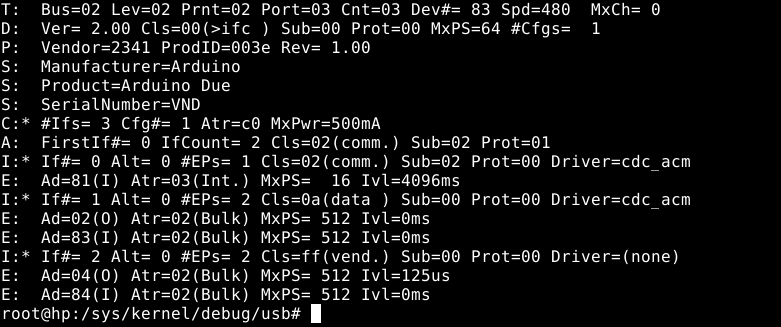
To check for proper enumeration once the above code has been added to your sketch, compiled, and uploaded to the MCU is straightforward.
As root, run :
cat /sys/kernel/debug/usb/devicesAnd the bottom relevant lines (ep 04 and 84 of interface 2) should appear once the native USB port is plugged to the computer :
Libusb code
Now it is time to add libusb code to your C++ project, and add some #define and declarations
// BULK USB VENDOR MODE
#include <libusb.h>

//defines for bulk interface
#define URB_SIZE 96 // In our case URB_SIZE = Packet size = 96 bytes
#define N_URBS 32 // 16 to 32 URBS in flight seems ok for data rates in the low MB/s range
#define VID 0x2341 // vendor ID of our device
#define PID 0x003e // product ID of our device
#define USB_BULK_IFACE 0x2 // Bulk interface ID
#define EP_IN 0x84 // endpoint IN address
#define EP_OUT 0x4 // endpoint OUT address (not used)

struct  libusb_transfer *usbxfer[N_URBS];
uint8_t  *usbbuf[N_URBS];
std::atomic_bool readbulk_exit(false);
std::atomic_bool USB_transfer_active(true);
libusb_context *ctx;
libusb_device_handle *h;Add a FIFO scheduled thread (bulk_read_thread) that will make the initial transfer submit as well as pump the event driven libusb.
pthread_t bulk_read_thread;
pthread_attr_t bulk_read_thread_attr;
pthread_attr_init(&bulk_read_thread_attr);
pthread_attr_setinheritsched(&bulk_read_thread_attr,PTHREAD_EXPLICIT_SCHED);
pthread_attr_setschedpolicy(&bulk_read_thread_attr,SCHED_FIFO);
sched_param param{};
param.sched_priority = 10;
pthread_attr_setschedparam(&bulk_read_thread_attr,¶m);
thread_rc = pthread_create(&bulk_read_thread,&bulk_read_thread_attr, BulkReadThread,NULL);
if(thread_rc != 0)
{
perror("Bulk reader thread creation error");
DebugPrint(dbgstr("thread_rc"),thread_rc,0);
return -1;
}
the sched_priority attribute is very important. use the ps command to get SCHED_FIFO threads and their priorities, and set priority accordingly as to obtain a stable data flow and so as not make the system irresponsive or lag. Remember that SCHED_FIFO threads have precedence over most of other threads on a system (SCHED_OTHER)
The Thread function follows :
void * BulkReadThread(void * arg)
{
    mlockall(MCL_CURRENT | MCL_FUTURE);

    DebugPrint(dbgstr("Enter USB Bulk read thread"),0);

    if(USE_BULK)
    {
        for(int i = 0; i < N_URBS; i++)
        {
            libusb_submit_transfer(usbxfer[i]);
        }
    }


    while(!(readbulk_exit.load()))
    {
        //usleep(100);
        libusb_handle_events(ctx);
        //DebugPrint(dbgstr("PutSerialSamples ok"),0);
        sched_yield();
    }

    sched_yield();
    return 0;
}The readbulk_exit atomic boolean is used to signal the thread (externally) that it needs to stop USB event polling operations which will quench transfers, Which is used in a graceful program termination.
This thread does not populate directly the data buffer so it can be consumed. It only submits initial transfer requests and pumps events through libusb_handle_events(ctx) The setup of the population of the buffer is done by libusb_fill_bulk_transfer() once, where we supply a callback function, rx_usb_bulk(). See below.
sched_yield() in that case is quite important as it guarantees some throttling and helps with system responsiveness. It relinquishes the CPU and other sched_fifo threads can be immediately processed, regardless of priority.
mlockall() is an optimization as it locks all pages in memory and prevents paging. It may have profound effects on allocation, and should probably happen when most of allocation is done or memory reserved using techniques appropriate, which are beyond the scope of this article. Use with caution.
Of course, now we also need to initialize the whole libusb stack to handle our device :
libusb_init(&ctx);
libusb_set_option(ctx,LIBUSB_OPTION_LOG_LEVEL,LIBUSB_LOG_LEVEL_WARNING);


h = libusb_open_device_with_vid_pid(ctx,VID,PID);
if (!h)
{
    DebugPrint(dbgstr("USB open device failed, is it plugged ?"),0);
    fflush(stdout);
    return 1;
}
DebugPrint(dbgstr("USB open device OK"),0);


if(libusb_kernel_driver_active(h,USB_BULK_IFACE) == 1)
{
    libusb_detach_kernel_driver(h,USB_BULK_IFACE);
    DebugPrint(dbgstr("kernel driver detach OK (should not happen, no driver should be attached)."),0);
}

if(libusb_claim_interface(h,USB_BULK_IFACE) < 0)
{
    DebugPrint(dbgstr("USB claim interface failed."),0);
    fflush(stdout);
    return 1;
}
DebugPrint(dbgstr("USB claim interface OK."),0);


for(uint8_t i = 0; i < N_URBS; i++)
{
    usbbuf[i] = (uint8_t *) aligned_alloc(64,URB_SIZE);
    usbxfer[i] = libusb_alloc_transfer(0);
    libusb_fill_bulk_transfer(
        usbxfer[i],
        h,
        EP_IN,
        usbbuf[i],
        URB_SIZE,
        rx_usb_bulk,
        NULL,
        0
    );
}

readbulk_exit.store(true);
And finally, the rx_usb_bulk() callback function :
static void rx_usb_bulk(struct libusb_transfer *t)
{
    if(t->status == LIBUSB_TRANSFER_COMPLETED)
    {
        if(t->actual_length > 0)
        {
            PutSamplesUSB(t->buffer,t->actual_length);
            //DebugPrint(dbgstr("Processing of USB transfer buffer,t->actual_length"),t->actual_length,0);

        }
        if (USB_transfer_active.load())
        {
            libusb_submit_transfer(t);
            //reschedule transfer immediately, unless signalled to stop.
        }
    }
}PutSamplesUSB() is a user project function that handles incoming buffer data, to populate, let’s say a circular buffer from the t->buffer source.
USB_transfer_active is an atomic boolean variable that signals to stop submitting new transfers. It needs to be set to false first before setting readbulk_exit to true (that in turns make the the thread that processes libusb events to join). This happens usually in the graceful process exit / cleanup routines. See below.
Cleanup
Cleanup is required in traditional C++ fashion as well as libusb required calls. But first the dedicated thread that does the libusb event polling must be notified to join.
USB_transfer_active.store(false);
DebugPrint(dbgstr("setting USB_transfer_active to false (won't submit new transfers)"),0);

for(int i=0; i < N_URBS;i++)
{
    libusb_cancel_transfer(usbxfer[i]);
    DebugPrint(dbgstr("cancelling pending transfers, index="),i,0);

}
usleep(10000);
libusb_release_interface(h,USB_BULK_IFACE);
DebugPrint(dbgstr("interface released"),0);

libusb_close(h);
DebugPrint(dbgstr("USB device handle closed"),0);


readbulk_exit.store(true);

int s = pthread_join(bulk_read_thread,nullptr); // waiting for USB bulk read thread to join
if(s == 0)
{
    DebugPrint(dbgstr("USB bulk read thread joined"),s,0);
    libusb_exit(ctx);
    DebugPrint(dbgstr("libusb exit"),0);
}Here we use the boolean state variables to communicate with the thread to halt USB communication before releasing libusb resources.
This concludes the article about adding USB 2.0 (High-Speed) bulk endpoints on Arduino Due MCU and libusb interfacing on Linux.

Leave a Reply